
ChatGPT reminders that don’t get buried and actually happen
Not inside the chat. ChatGPT can name the follow-ups, but nothing tracks them afterwards. NoteitHub's Smart Reminders tool takes a pasted conversation, pulls out the deadlines and next steps, and saves them as dated tasks with a reminder on each. Free accounts get one reminder a month, Plus five and Pro fifty.
ChatGPT is great at planning — but reminders are where most plans die.
You leave the chat, life gets busy, and the important follow-up disappears into scrollback.
NoteitHub turns conversations into a living reminder list you can track in a dashboard, add to your calendar, and update whenever you return to the same topic. Instead of “AI advice you forget,” you get reminders that compound over time.
Best for follow-ups, deadlines, recurring routines, and “don’t forget” moments inside long threads.
See the transformation: chat → reminders → follow-through
A reminder only works if you can find it later. NoteitHub turns ChatGPT follow-ups into structured reminders you can track and schedule.
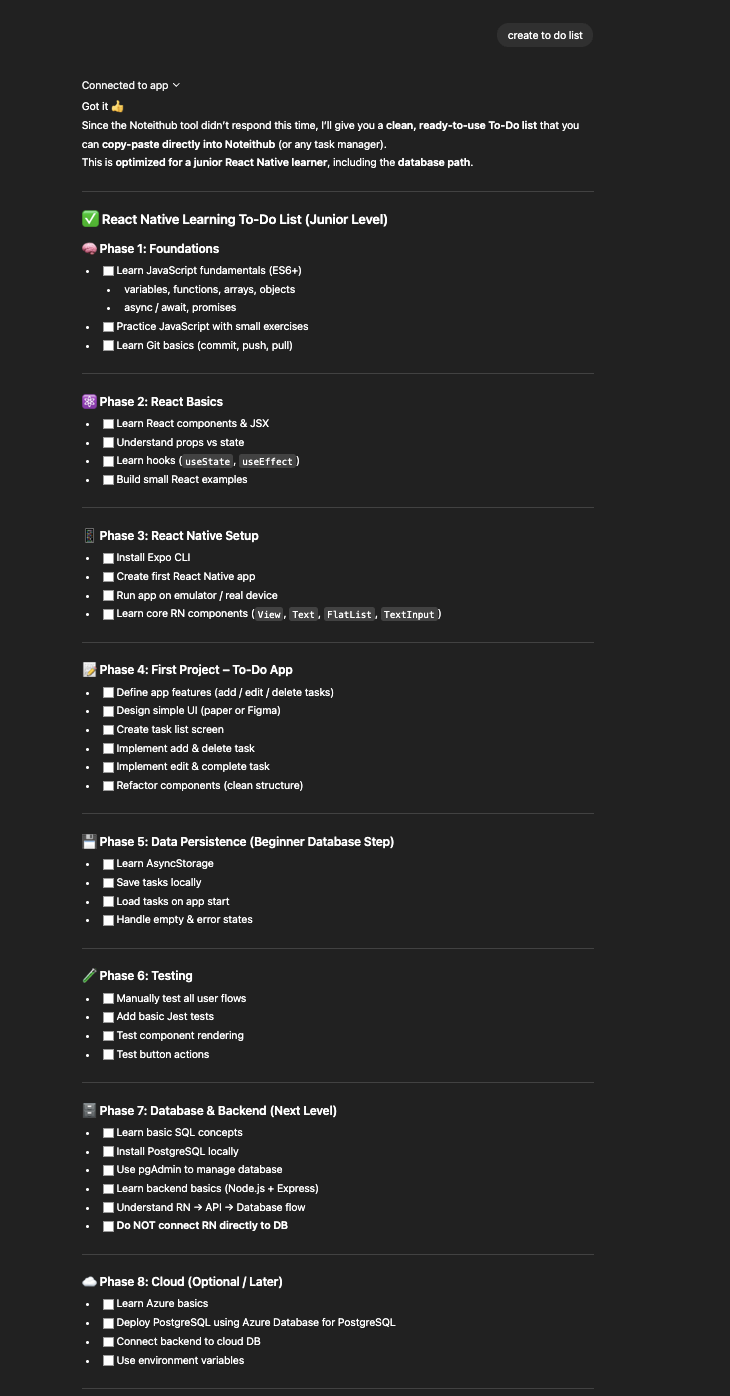
Before
Useful follow-ups inside a long chat — but no system to ensure they happen.
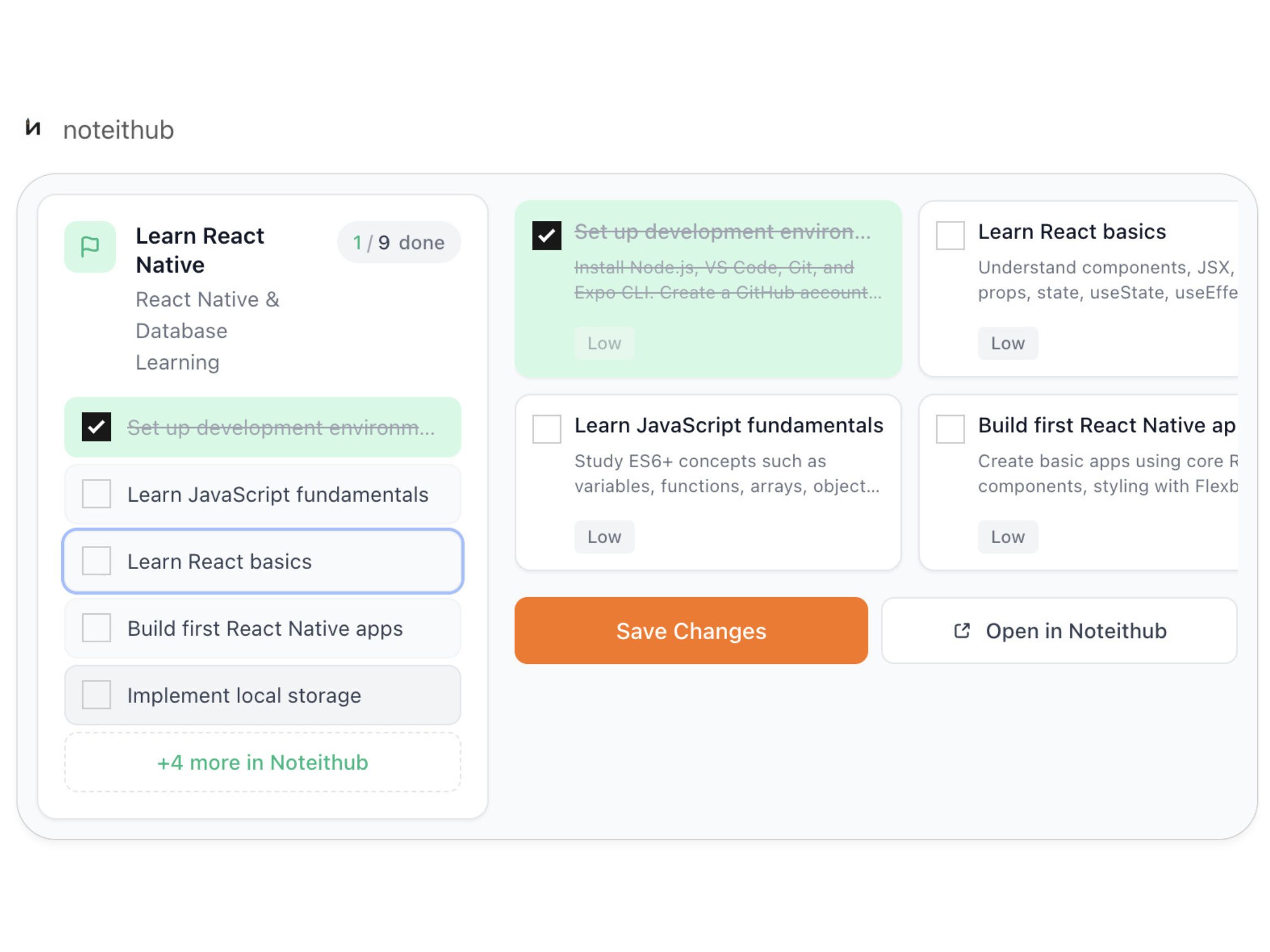
After
A living reminders list with progress tracking and calendar scheduling for real follow-through.
How to create reminders from ChatGPT
You can ask ChatGPT “remind me later,” but the reminder won’t exist unless it becomes something you can track. Here’s the workflow NoteitHub is built for.
- 1) Use NoteitHub inside a ChatGPT conversation. When follow-ups, deadlines, or action items show up, ask NoteitHub to create reminders.
- 2) Reminders are extracted and organized. NoteitHub turns “don’t forget” moments into clear reminder items you can actually execute.
- 3) Track progress in a dashboard. Mark reminders done, keep pending items visible, and skip the ones you decided aren’t important anymore.
- 4) Add reminders to your calendar. Convert reminders into scheduled time blocks, deadlines, or recurring routines.
- 5) Return later and keep the same reminder list alive. If you talk about the same topic again, NoteitHub updates your existing reminders list instead of restarting.
Schedule reminders in your calendar (the only place they get done)
Most reminders fail because they live in the wrong place. Your real day happens in your calendar, not in a chat thread.
With NoteitHub, reminders extracted from ChatGPT can be added to your calendar so you can block time for what matters: follow-ups, study sessions, bills, workouts, outreach, or deadlines.
This is what turns “AI planning” into execution: reminders become scheduled time, not just good intentions.
- Recurring routines (gym, language practice, weekly review).
- Follow-ups (emails, calls, renewals, check-ins).
- Deadlines (deliverables, applications, submissions).
One dashboard for every reminder, by topic
Chat history is not a reminder system. A dashboard is where you see what’s pending, what you finished, and what you ignored.
NoteitHub organizes reminders by topic so you can keep multiple areas of life moving: work projects, health goals, admin tasks, content schedules, and personal routines.
You don’t need more reminders. You need reminders that stay visible and get updated over time.
- Track statuses (done / pending / skipped).
- Find reminders fast without re-reading old chats.
- Keep continuity across new conversations on the same topic.
The continuity problem: “new chat” shouldn’t mean “new reminders”
In normal workflows, you have follow-ups in one conversation, then you open a new thread later and forget what you already planned. You lose context and rebuild the reminder list from scratch.
NoteitHub is designed to keep one evolving reminder list per topic. When you return to the same subject, it can add new reminders to the same list so your progress stays in one place.
If the new chat is a different goal, NoteitHub creates a new list — so you don’t mix unrelated reminders.
Related pages you’ll likely want next: ChatGPT To-Do List and Save ChatGPT conversations.
Common use cases for ChatGPT reminders
People search for “ChatGPT reminders” because they want follow-through. Here are a few ways NoteitHub fits into real life and work.
Meeting follow-ups
Turn meeting notes into reminder items with owners and deadlines, then schedule them so nothing slips.
Bills and admin tasks
Extract reminders like renewals, paperwork, and payments from planning chats and keep them visible.
Gym and habit routines
Convert a plan into recurring reminders so you don’t rely on motivation alone.
Study and exam prep
Turn study plans into reminder blocks and keep updating the same list until the exam date.
Outreach and networking
Create reminders for follow-up emails, LinkedIn messages, and relationship check-ins.
Project deadlines
Extract milestone reminders from planning threads and turn them into calendar commitments.
Frequently asked questions
Is there a way to set reminders from ChatGPT?
Yes — but reminders need a place to live. NoteitHub converts ChatGPT follow-ups into a reminder list you can track and schedule in your calendar.
Why do ChatGPT reminders get forgotten?
Because they stay inside the chat. Once the conversation is buried, the reminders lose visibility. NoteitHub moves them into a dashboard and calendar so they stay actionable.
Can reminders stay connected to a topic over time?
Yes. NoteitHub keeps one evolving reminder list per topic, so new conversations can update the same list instead of restarting.
Can I schedule reminders as calendar events?
Yes. You can push reminders into your calendar as time blocks, deadlines, or recurring routines.
What should I build next for SEO?
These pages pair well together: ChatGPT To-Do List, ChatGPT Calendar, and ChatGPT Task Manager.