
The ChatGPT task manager that turns AI plans into real execution
Yes. NoteitHub adds one to ChatGPT itself: it connects as a ChatGPT app, turns what you discussed into tracked tasks, and keeps them in a dashboard outside the chat. Because the tasks live in NoteitHub rather than the thread, a later conversation on the same topic updates them instead of duplicating the list.
ChatGPT is amazing at planning. You can ask for a weekly routine, a project roadmap, a study schedule, a content calendar, or a step-by-step plan for anything. But there’s a predictable problem: the plan lives inside a chat, not inside a system you can actually follow.
NoteitHub acts as a task manager for your ChatGPT conversations. It turns AI plans into trackable tasks, helps you schedule tasks on your calendar, and keeps everything organized by topic so you can return later and continue — without restarting from scratch.
Best for long ChatGPT threads that contain tasks, decisions, and steps you don’t want to lose.
From chat → tasks → calendar → progress
A task manager isn’t just a list. It’s structure: tasks you can track, a schedule you can follow, and a place to manage everything later. That’s what NoteitHub adds to ChatGPT.
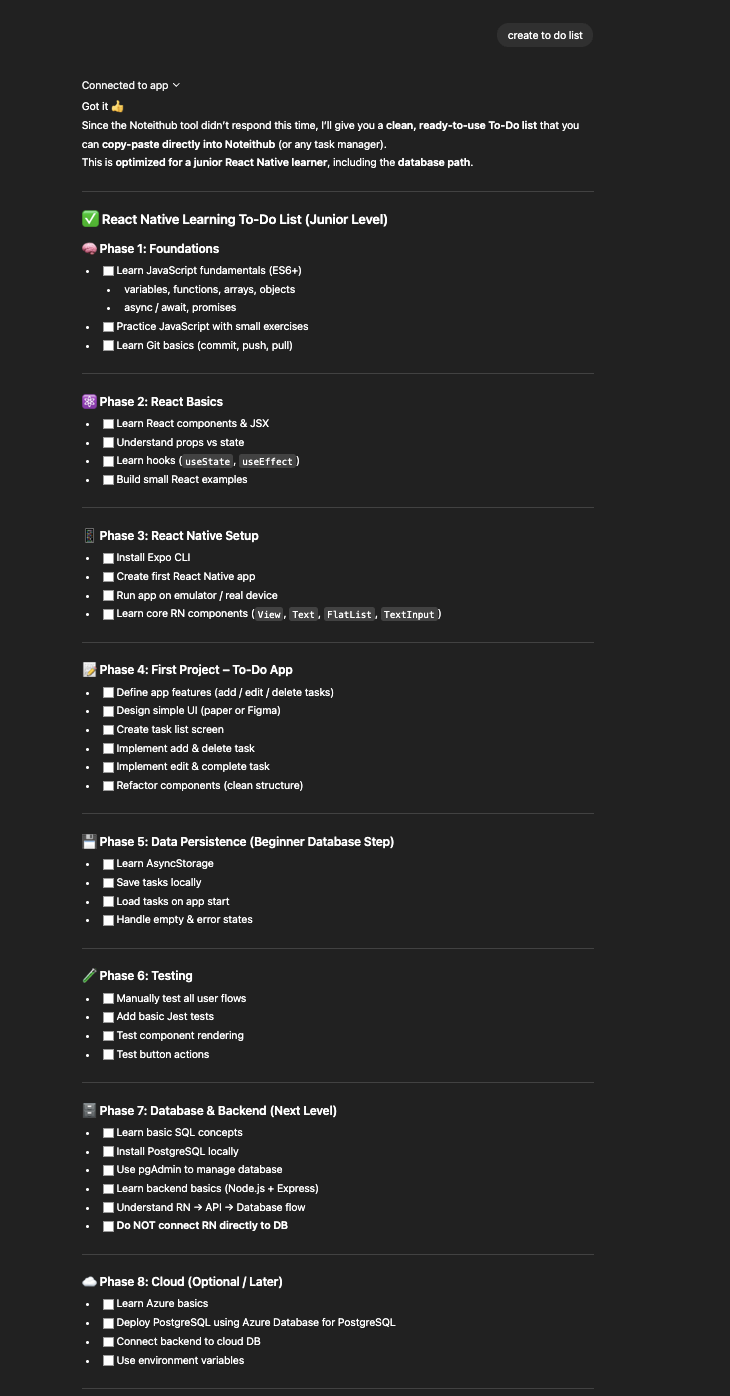
Before
Useful follow-ups inside a long chat — but no system to ensure they happen.
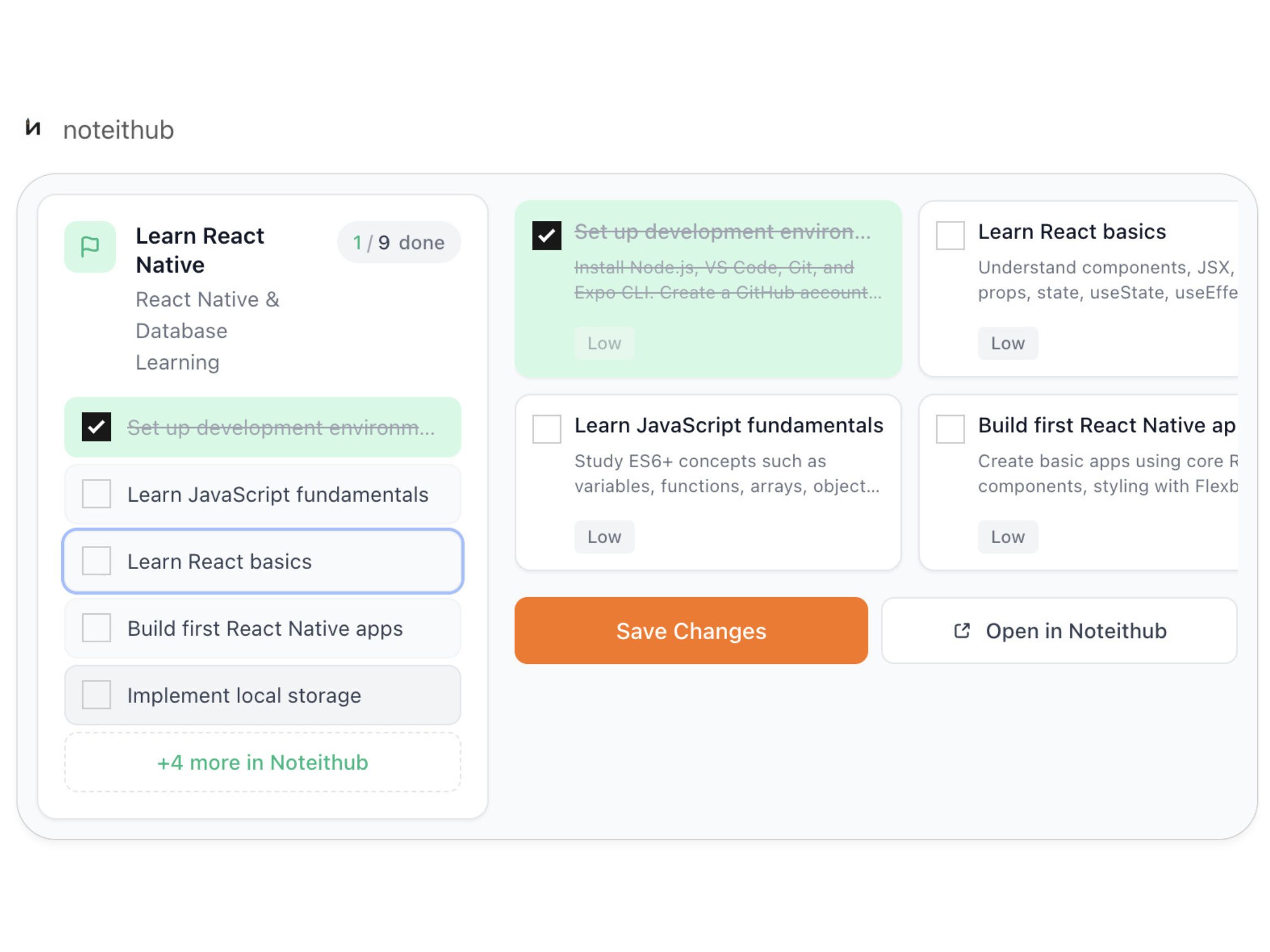
After
A living reminders list with progress tracking and calendar scheduling for real follow-through.
How to use ChatGPT as a task manager (the workflow)
If you want ChatGPT to be useful long-term, it needs a place where tasks live, where progress is visible, and where you can continue later. Here’s the workflow people use with NoteitHub.
- 1) Plan in ChatGPT as usual. Ask for a roadmap, routine, checklist, timeline, or strategy.
- 2) Turn the conversation into tasks. Ask NoteitHub to create a task list from the plan.
- 3) Track progress instead of rereading the chat. Mark tasks done / pending / skipped to keep the plan realistic.
- 4) Add tasks to your calendar. Turn tasks into time blocks so the plan becomes consistent action.
- 5) Come back later and update the same list. When the topic returns, NoteitHub can add new tasks to the existing plan.
- 6) Keep a journal alongside the plan. Store what worked, what didn’t, and what you decided so your progress compounds.
Why “tasks” are the missing layer in ChatGPT productivity
Most AI tools help you think. But productivity happens when thinking becomes action. That requires tasks with clear next steps — and a way to see progress over time.
If you’ve ever asked ChatGPT for a plan, then opened a new chat later and forgot everything, you’ve felt the missing layer. NoteitHub adds that layer by turning conversations into a system: tasks, scheduling, and topic continuity.
This is why task managers work: they separate “ideas” from “execution.” With a ChatGPT task manager, you keep the best part (AI planning) and eliminate the worst part (plans disappearing).
Add AI tasks to your calendar (so you actually do them)
A list is a promise. A calendar is a commitment. When tasks never touch your schedule, they get pushed “until later,” and later never comes.
NoteitHub helps you schedule tasks so your week reflects your plan — study sessions, gym routines, posting schedules, project milestones, and follow-ups. This is where ChatGPT becomes genuinely useful: not just generating ideas, but driving consistent execution.
- Time blocks: turn tasks into 30/60/90-minute sessions.
- Deadlines: add due dates to deliverables so work doesn’t drift.
- Recurring routines: build weekly repetition without re-planning.
When you start a new chat, your task list should update (not reset)
Most people don’t work in one conversation. You plan today, then return next week. You get new information, priorities change, and the plan should evolve.
NoteitHub keeps topic-based lists alive. If your new chat is related to the same topic, it can add new tasks to the existing list so progress stays in one place. If it’s a different goal, it creates a new list so your system stays clean.
This is how your work compounds: you’re not just generating plans, you’re building a durable execution system.
Related pages: ChatGPT To-Do List • Save ChatGPT conversations • ChatGPT Journal • ChatGPT Study Plan
What people use a ChatGPT task manager for
A ChatGPT task manager is useful anywhere you ask for a plan. These examples cover common high-intent needs and show where NoteitHub fits into real workflows.
Students
Convert study chats into tasks + calendar blocks. Track revision, practice tests, and deadlines by subject.
Founders
Turn strategy and product planning into milestones. Keep decisions and next steps consistent across weeks.
Developers
Save debugging plans and refactor steps. Track what you tried, what worked, and what to do next.
Marketers
Turn campaign strategy into checklists and content calendars. Keep execution consistent week to week.
Operations & support
Convert troubleshooting and SOP creation into reusable tasks and templates your team can follow.
Personal goals
Build routines for fitness, habits, and life admin. Keep one evolving plan instead of restarting monthly.
Frequently asked questions
Is there a task manager for ChatGPT?
Yes. NoteitHub turns ChatGPT conversations into trackable tasks, lets you schedule them on a calendar, and keeps topic-based lists you can update later.
How do I turn a ChatGPT plan into tasks?
Ask NoteitHub to create a task list from your conversation. Then manage the tasks in your dashboard and schedule them as calendar blocks for consistency.
Can I update the same list later?
Yes. If the new chat is related to the same topic, NoteitHub can add new tasks to your existing list instead of starting over.
What should I build next for SEO?
Next cluster pages: ChatGPT To-Do List and Save ChatGPT conversations.