
The ChatGPT to-do list that remembers your conversations and keeps updating
ChatGPT can draft a to-do list, but it can't keep one. NoteitHub connects to ChatGPT as an app: ask it to save a plan and the tasks are written to a dashboard you can reopen, edit, and schedule. Return to the topic in a new chat and the same list updates instead of starting over.
Save any ChatGPT plan as tasks you can track, update, and schedule — instead of losing it in chat history.
ChatGPT can generate great plans — workouts, study schedules, product launch checklists, content calendars, meeting follow-ups. The problem is what happens next: tasks get buried in chat history, you open a new thread later, and you end up rebuilding the same plan from scratch.
NoteitHub fixes the missing part: it turns a conversation into a living to-do list you can track in a dashboard, send to your calendar, and update whenever you return to the same topic.
Best for long threads where action items, decisions, and next steps get buried.
See the transformation: chat → tasks → progress
A good plan is only valuable if you can reuse it later. NoteitHub turns the “messy” part of a ChatGPT thread into structured tasks you can track and update over time.
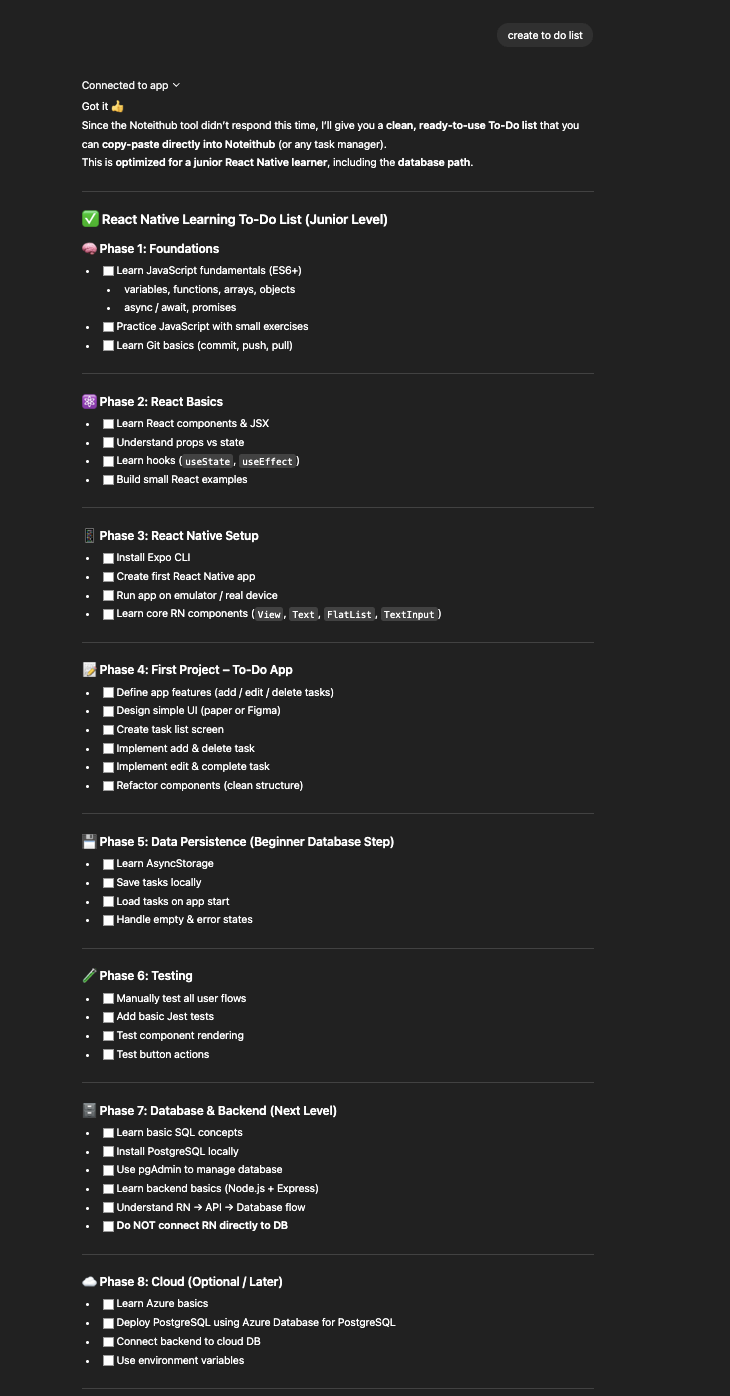
Before
A long conversation with great advice — but no simple way to track what to do next.
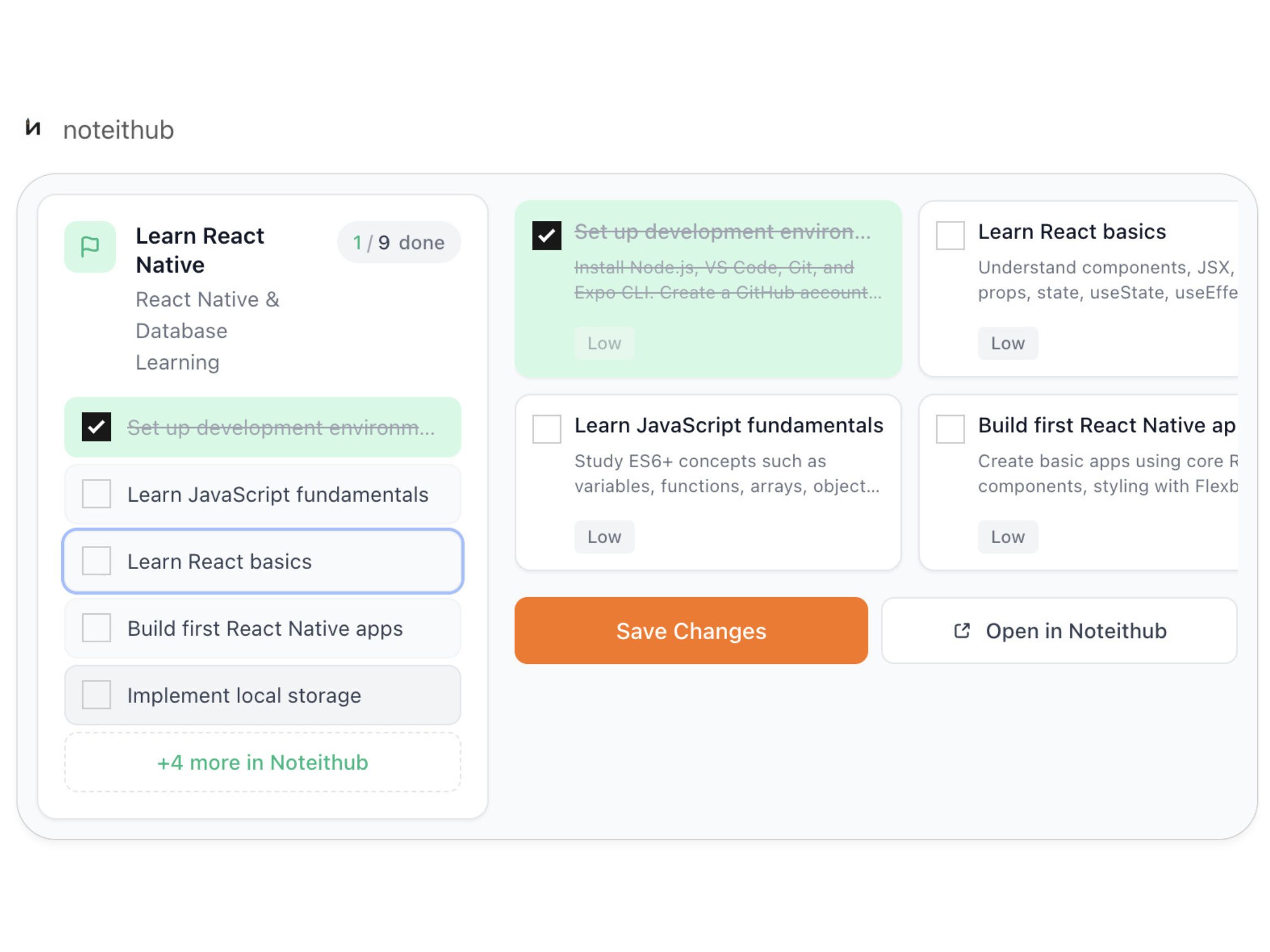
After
A living to-do list with progress that you can revisit, update later, and schedule on your calendar.
ChatGPT checklist vs a living to-do list
Asking ChatGPT for a checklist is useful — until you need continuity. Here’s what changes when the list becomes trackable and updateable.
Feature
ChatGPT checklist
NoteitHub
Keeps tasks after the chat ends
Usually lost in history
Saved by topic in your dashboard
Task statuses (done / pending / skipped)
Manual (if you copy to another tool)
Built-in tracking
Updates the same list next time
You restart the plan
Adds tasks to the existing list
Calendar time blocks
Not automatic
Schedule tasks as calendar blocks
Clean, executable tasks
Often verbose / mixed
Extracted + structured action items
One place for all topics
Spread across threads
Central dashboard for all lists
How to create a to-do list from ChatGPT
You can ask ChatGPT to “make a checklist,” but you’ll lose it later unless it becomes a system you can track. Here’s the workflow NoteitHub is built for.
- 1) Add NoteitHub to your ChatGPT conversation. When a thread becomes useful, ask NoteitHub to create a to-do list from the messages.
- 2) Tasks are extracted and organized. Action items are grouped, cleaned up, and formatted so they’re actually executable — not just a summary.
- 3) Track progress with real statuses. Mark tasks done, keep pending items visible, and skip items intentionally (so the plan stays honest).
- 4) Add tasks to your calendar. Turn “someday” into scheduled work: workouts, study sessions, posting schedules, follow-up reminders, deadlines.
- 5) Return later and keep the same list alive. If a new conversation is related to the same topic, NoteitHub updates your existing list (or creates a new one if it’s a different goal).
Copy-paste prompts for better ChatGPT task lists
These prompts help you turn messy conversations into clean, executable tasks — and they work even better when the result becomes a list you can track and update.
Extract action items
Turn the last 30 messages into a to-do list. Include clear task titles, the reason for each task, and the next concrete step.
Add owners + due dates
Convert this conversation into tasks with owners and due dates. Use realistic deadlines and mark anything unclear as 'Needs clarification'.
Group by priority
Create a task list grouped by: Today / This week / Later. Add a priority label (High/Medium/Low) for each task.
Create calendar blocks
Turn these tasks into calendar blocks. Estimate durations (15/30/60 min) and propose a schedule for the next 7 days.
Update an existing list
This chat is about the same topic as my previous plan. Update the existing to-do list by adding new tasks and marking duplicates.
Make tasks measurable
Rewrite the tasks as measurable outcomes (definition of done). Add acceptance criteria for each task.
Turn a plan into a checklist
Convert this plan into a checklist with steps that can be checked off. Keep each step short and actionable.
Create a weekly routine
Create a weekly routine from this conversation. Include recurring tasks and a review step at the end of the week.
Add ChatGPT tasks to your calendar (so plans become real)
A to-do list is helpful, but a calendar is commitment. Many people use ChatGPT for planning and motivation, then lose momentum because the plan never becomes scheduled time.
With NoteitHub, tasks from a conversation can be turned into calendar items, so you can block time for what matters: your gym sessions, study blocks, content publishing, or project deadlines.
This solves a common problem with AI advice: it’s easy to generate a plan, but hard to consistently execute it. When tasks live next to your real schedule, follow-through becomes much more likely.
- Schedule recurring routines like workouts, language practice, or revision.
- Set deadlines for projects, launches, or deliverables.
- Turn plans into time blocks so your day reflects your priorities.
Manage everything in one dashboard
Chat history is not a task manager. A dashboard is where execution happens: you need visibility into what’s pending, what’s done, and what you decided to ignore.
NoteitHub keeps your topic-based lists organized in one place, so you can browse your active goals, review progress, and continue without re-reading the entire conversation.
This is especially useful if you have multiple ongoing projects: health goals, learning goals, work tasks, content plans, and personal checklists — all created from AI conversations.
- Track statuses (done / pending / skipped) to keep lists realistic.
- Manage by topic so you can find the right list instantly.
- Reuse lists instead of creating new tasks every time you ask ChatGPT.
What happens when you start a new chat on the same topic?
This is the core difference between “a ChatGPT checklist” and a “system that compounds.” Normally, you start a new conversation weeks later and lose all continuity. You have to explain context again, rebuild the plan, and you can’t tell what you already completed.
NoteitHub is designed around topic continuity. When you talk about the same subject again (for example, “gym routine” or “exam prep”), it can add new tasks to your existing list so your progress stays in one place.
If the new chat is truly a different goal, it creates a new list — so you don’t mix unrelated tasks. Either way, you get a clear record of what you planned and what you actually did.
Common use cases for a ChatGPT to-do list
People search for “ChatGPT to-do list” because they want execution — not another plan they’ll forget. Here are a few ways NoteitHub is used across real life and work.
Fitness plans that evolve
Start with a routine today. When you ask again next month, new tasks get added to the same list so you can track consistency.
Exam prep and study schedules
Turn explanations into weekly tasks, revision blocks, and checklists. Keep the plan alive until the exam is over.
Project planning at work
Convert strategy chats into milestones and steps. Track progress so the plan doesn’t disappear after the first brainstorm.
Meeting follow-ups
Turn meeting summaries into owners, deadlines, and next steps. The list becomes your execution layer.
Content + social media calendars
Turn a strategy chat into recurring content tasks. Then schedule them so posting stays consistent.
Personal routines and habit building
Translate advice into repeatable checklists you can review weekly. Progress becomes visible and motivating.
Related guides (build topical authority)
If you’re building a system around ChatGPT productivity, these pages are designed to work together.
Frequently asked questions
Can ChatGPT create a to-do list from a conversation?
Yes. But the list often gets lost across chats. NoteitHub saves the conversation, extracts action items, and keeps them in a trackable list you can revisit later.
How do I keep the same to-do list when I come back weeks later?
That’s the continuity problem. NoteitHub keeps one evolving list per topic, so when you return to the same subject, new tasks can be added to the existing list instead of restarting.
Can I add tasks directly to my calendar?
Yes. After tasks are created, you can push items to your calendar to turn plans into scheduled time blocks.
Where do I manage all my ChatGPT lists?
In your NoteitHub dashboard. You’ll see active lists by topic and track what’s done, pending, or skipped.
What’s the difference between a summary and a task list?
A summary helps you remember. A to-do list helps you execute. NoteitHub focuses on turning conversations into steps you can track and continue later.