
Build a ChatGPT study plan that becomes a to-do list + calendar you actually follow
Yes, but ChatGPT forgets it by the next session. NoteitHub connects to ChatGPT as an app and saves the plan as dated tasks you can tick off, reschedule, and reopen weeks later. Ask about the same subject in a new chat and the existing plan updates rather than starting from scratch.
Students use ChatGPT to understand topics, prepare for exams, and plan assignments. The problem isn’t getting information — it’s turning a plan into consistent study sessions you can actually complete.
NoteitHub turns your ChatGPT study conversations into a trackable study to-do list, helps you schedule tasks on your calendar, and keeps a study journal you can continue later. Everything stays connected to the same topic, so when you return weeks later you don’t start over.
Best for students who want a clear weekly plan, deadlines, and progress—without rebuilding the same study plan every time.
From study chat → structured study plan
Instead of copying text into random notes, NoteitHub turns your ChatGPT conversation into tasks, schedules, and a journal you can keep building on.
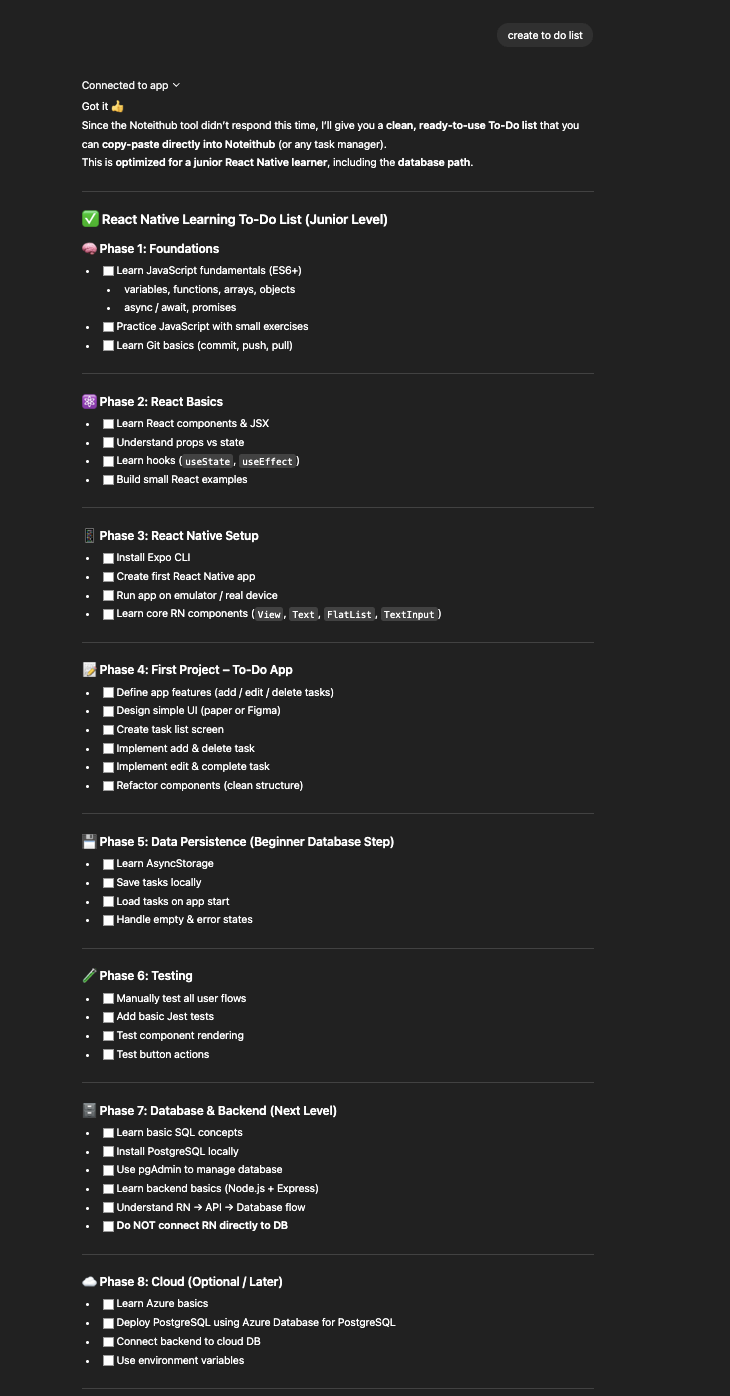
Before
Useful follow-ups inside a long chat — but no system to ensure they happen.
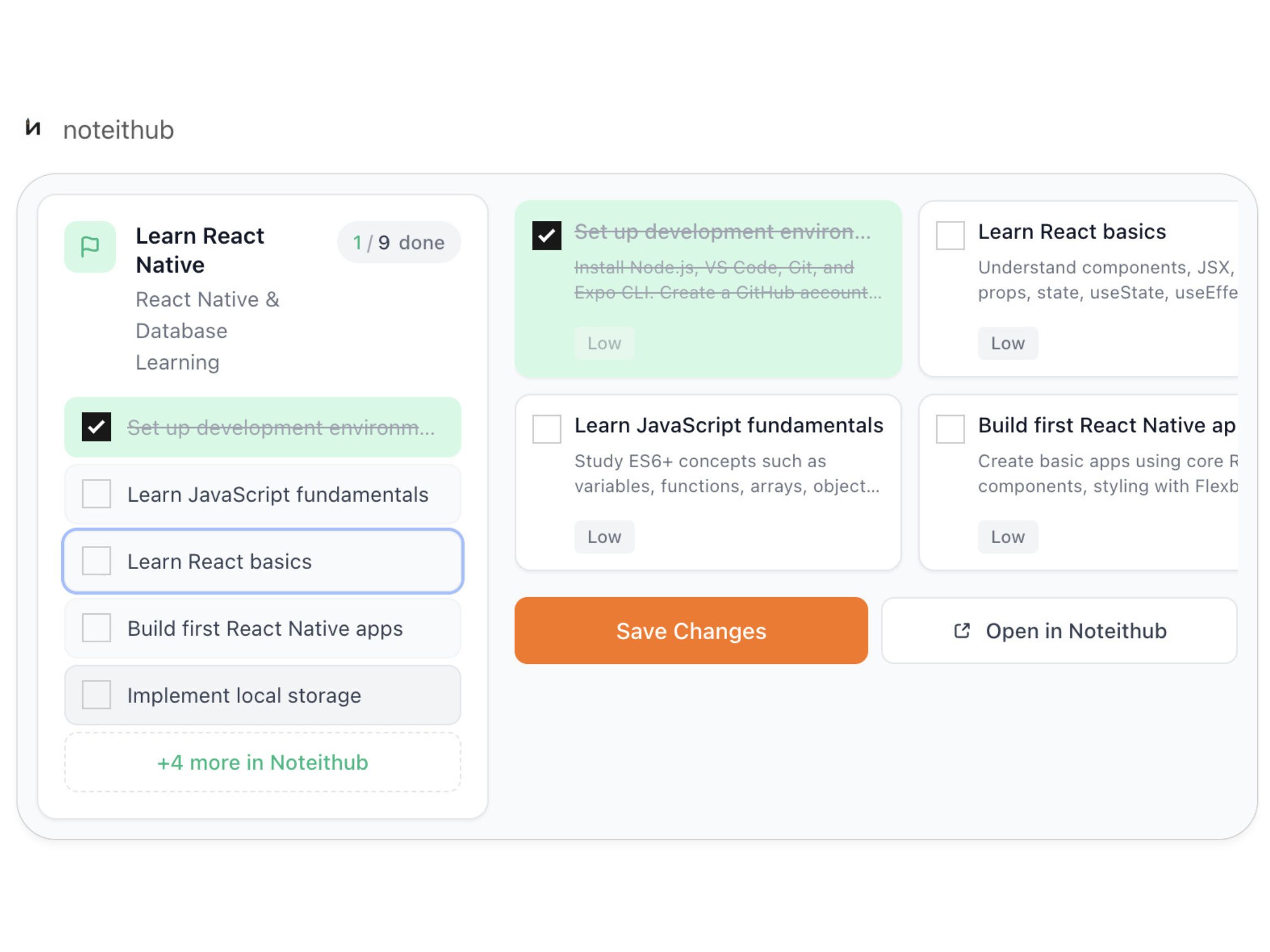
After
A living reminders list with progress tracking and calendar scheduling for real follow-through.
How to create a ChatGPT study plan (that doesn’t disappear)
The best study plans are simple: clear tasks, a schedule, and a way to track progress. Here’s the workflow students use with NoteitHub.
- 1) Study with ChatGPT like you normally do. Ask questions, request practice, break down topics, and build a plan.
- 2) Ask NoteitHub to create a study to-do list. Instead of leaving the plan in chat history, NoteitHub converts it into trackable tasks (chapters, exercises, practice tests).
- 3) Schedule it on your calendar. Turn tasks into time blocks: “Review Chapter 3 (45m)”, “Practice problems (30m)”, “Mock exam (90m)”.
- 4) Track progress and keep momentum. Mark tasks done/pending so you always know what’s next, even when motivation drops.
- 5) Continue next week without restarting. When you open a new chat about the same subject,NoteitHub can update the same study plan with new tasks and revisions.
- 6) Keep a study journal alongside the plan. Save what you learned, what you struggled with, and what to revisit before the exam.
Turn a study plan into calendar blocks (consistency beats motivation)
Most students don’t fail because they don’t have a plan. They fail because they don’t have a schedule. A list tells you what to do; a calendar tells you when you’ll do it.
NoteitHub helps you convert tasks into calendar blocks so studying becomes part of your week: short daily sessions, longer review blocks on weekends, and dedicated time for practice tests.
This is especially useful before exams: you can spread topics over days, reserve time for revision, and avoid last-minute panic cramming.
- Daily consistency: 30–60 minute blocks that build progress automatically.
- Revision planning: schedule spaced repetition and review days.
- Practice under pressure: mock exams with realistic time limits.
Student workflows that work (real scenarios)
Students use ChatGPT for many different study styles. These examples are designed to match what people actually search for when they type “ChatGPT study plan”.
Exam prep (2–4 weeks)
Create a weekly plan: topics → practice → revision → mock exams. Update the same plan as you discover weak areas.
Assignment breakdown
Turn rubric + requirements into tasks: research, outline, draft, citations, final edits. Schedule deadlines so you don’t rush.
Language learning
Daily tasks: vocab, listening drills, speaking prompts, weekly review. Track consistency and add tasks over time.
STEM problem practice
Generate practice sets, track mistakes, and schedule targeted review sessions for your weak topics.
Reading / literature
Build a reading checklist plus journal prompts. Save insights and revisit before essays or exams.
Study accountability
Track what you planned vs what you completed. The plan becomes honest and improves every week.
When you return later, your study plan should update (not restart)
Students usually study in bursts. You plan hard for a few days, then you get busy. When you come back, you start a new chat and rebuild the entire plan. That’s wasted energy.
NoteitHub is designed for topic continuity. If you return to the same class or exam later, it can update the same to-do list with new tasks: extra practice, revision sessions, or new deadlines.
This is how progress compounds: you don’t lose what you already built, and you can see what’s done, what’s pending, and what needs more attention.
Related pages: ChatGPT To-Do List • Save ChatGPT conversations • ChatGPT Journal
Keep a study journal (so you remember what you learned)
Students don’t just need tasks — they need retention. A journal helps you capture what you learned, what you struggled with, and what to revisit.
With NoteitHub, you can keep a study journal connected to the same topic as your to-do list and calendar schedule. That means when you come back later, you don’t just see tasks — you see context.
This is especially useful for long courses: your understanding builds over time, and your notes stay in one place instead of scattered across threads.
Frequently asked questions
Can ChatGPT create a study plan?
Yes. But most students lose it later. NoteitHub turns the plan into a study to-do list, helps you schedule tasks on a calendar, and keeps a journal you can continue later.
How do I make sure I actually follow the plan?
Make it trackable and scheduled. NoteitHub gives you tasks (what to do) plus calendar blocks (when to do it) so studying becomes consistent.
Can I update my study plan later?
Yes. If a new chat is related to the same class or exam, NoteitHub can update your existing plan with new tasks instead of starting over.
What should I build next for SEO?
Next pages: ChatGPT Task Manager and Save ChatGPT conversations.