
How Noteithub turns ChatGPT conversations into living systems you can track, reuse, and update later
NoteitHub connects to ChatGPT as an app. Ask it to save what you just discussed and it writes to-dos — each with a status, a priority, and an optional due date — or a tagged journal entry into a dashboard on noteithub.com, filed under a goal. A later chat on that goal updates the same list.
ChatGPT is amazing at generating plans: a workout routine, a study schedule, a product checklist, a marketing calendar, a launch plan, or a set of action items after a meeting. The problem is not the quality of the plan. The problem is what happens after you close the tab.
Most people treat ChatGPT like a “one-time advice machine.” They ask for a plan, paste it somewhere, and move on. A week later, life happens. They open a new chat, forget what they already decided, and rebuild the same plan from scratch. That loop creates two hidden costs: lost time and lost momentum.
NoteitHub exists to solve that continuity problem. Instead of leaving your most useful chats trapped in history, it turns them into structured outputs—like to-do lists, reminders, journal entries, and topic-based plans—so you can track progress, keep everything organized in one dashboard, and keep the same system alive when the topic comes back weeks later.
Best for long threads where decisions, action items, and context get buried.
The transformation: chat → structure → progress
Chat is where ideas happen. Execution needs structure. NoteitHub bridges that gap by taking the messy middle of a conversation—half decisions, half context—and turning it into an output that can actually drive outcomes over time.
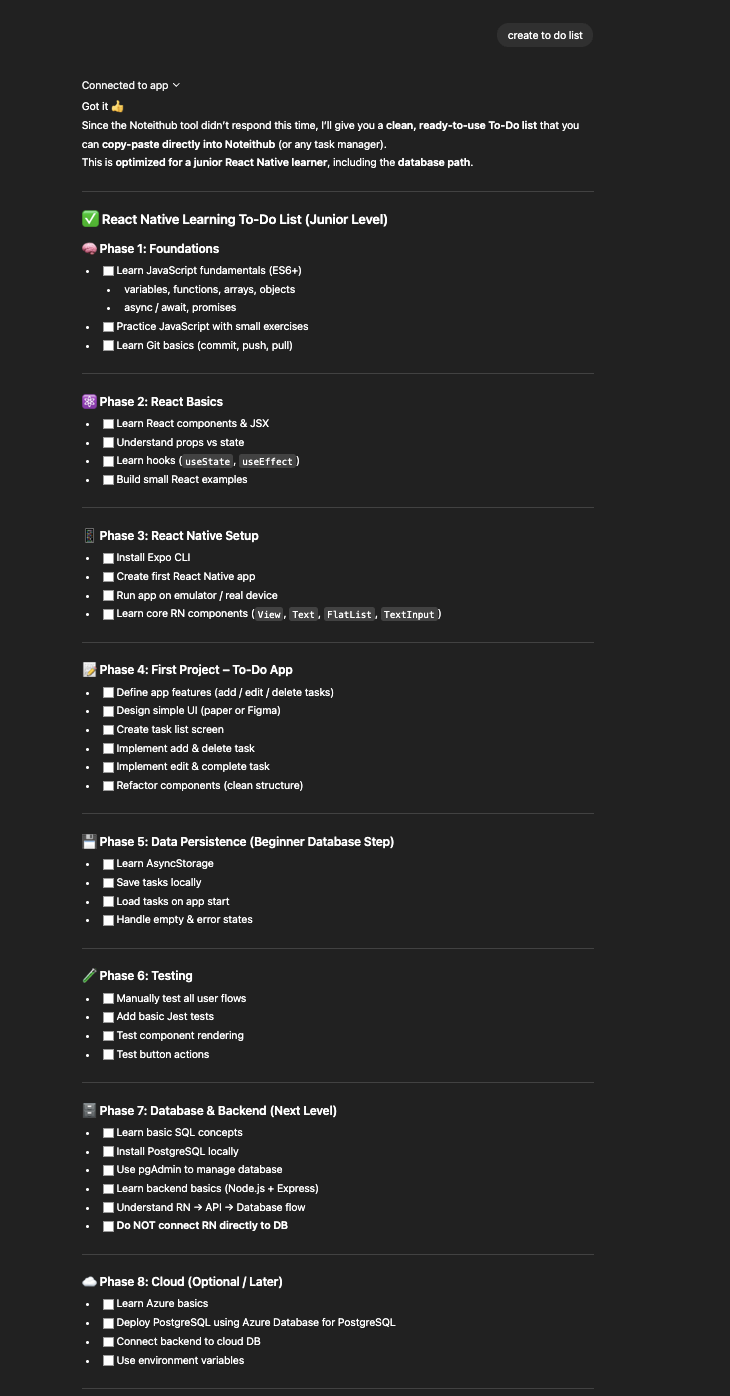
Before
Useful follow-ups inside a long chat — but no system to ensure they happen.
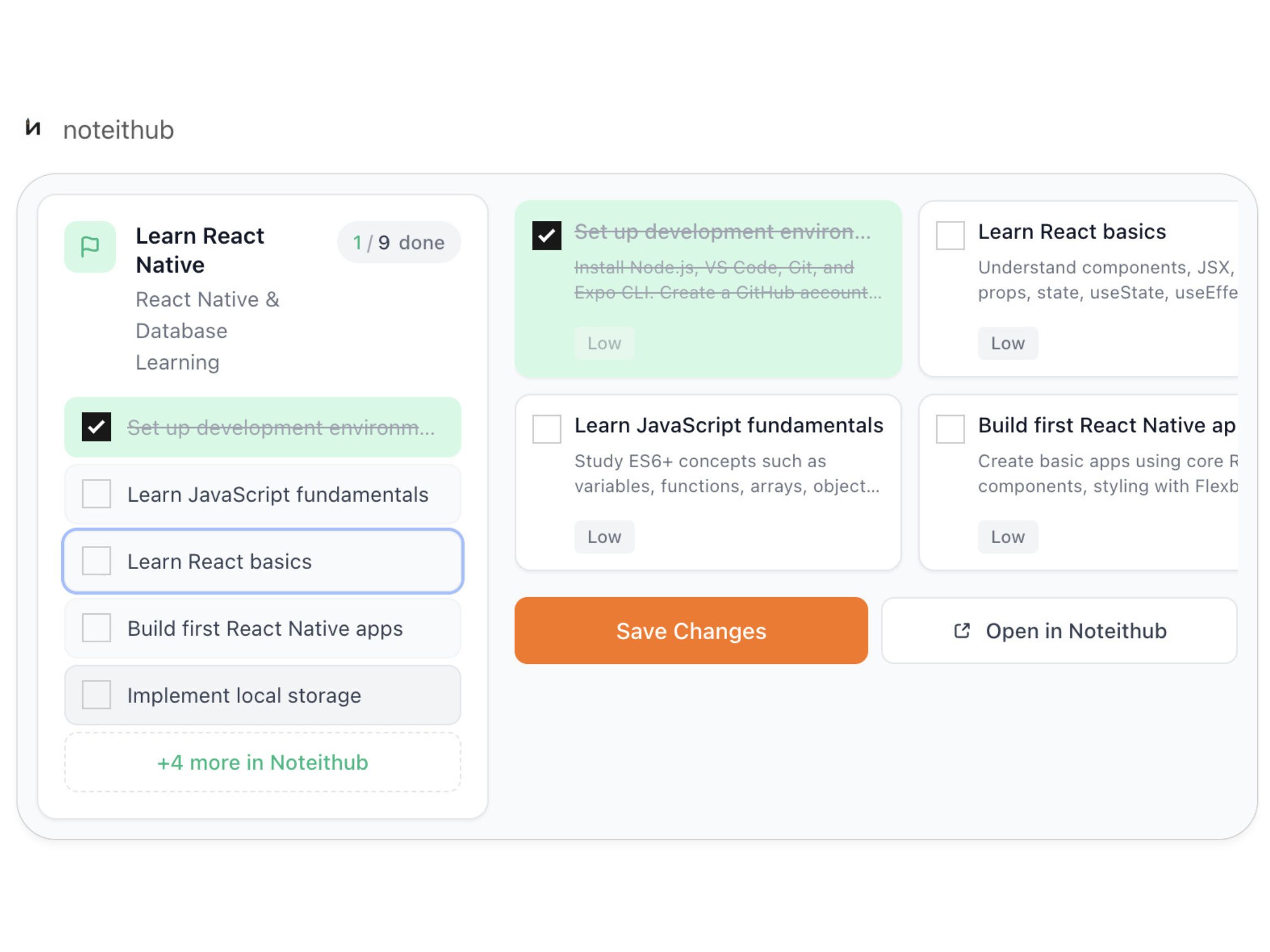
After
A living reminders list with progress tracking and calendar scheduling for real follow-through.
If you’ve ever searched for “save ChatGPT conversations,” “ChatGPT to-do list,” “ChatGPT calendar,” or “ChatGPT task manager,” what you really want is one thing: continuity. The ability to keep a plan alive across time, not trapped inside a single thread.
What NoteitHub creates from a ChatGPT conversation
Think of NoteitHub as the layer that sits between “AI ideas” and “real execution.” It turns conversation output into a few repeatable formats that fit real life:
Trackable to-do lists
Turn a chat into a list with real statuses (done / pending / skipped) so progress becomes visible and honest.
Reminders and deadlines
Convert follow-ups and “don’t forget” moments into reminders that survive past the chat window.
Calendar-ready tasks
Schedule the plan. Time blocks and deadlines turn intention into commitment.
Topic-based planning systems
One topic, one evolving system—so you can revisit a goal, add steps, and keep everything in one place.
Journals and reflection logs
Capture insights and reflections in a format you can come back to—especially for learning and personal growth.
Action items from notes
Turn meeting notes, brainstorming sessions, or planning chats into concrete next steps that don’t get lost.
Notice the difference: this is not “save a summary.” This is “save a system.” A summary is something you read. A system is something you live inside: you track it, update it, and reuse it until the goal is finished.
How NoteitHub works (step-by-step)
The workflow is intentionally simple. You should not need a new “process” to benefit from it. You keep using ChatGPT the way you already do—then when the conversation matters beyond today, you turn it into something trackable.
- 1) You have a normal ChatGPT conversation. This can be a planning thread, a brainstorming session, a study plan, a gym routine, a set of meeting notes, a career roadmap, or a personal goal breakdown. Nothing special is required—just a conversation that includes ideas, steps, or decisions.
- 2) When it becomes useful, you turn it into a structured output. Instead of copy/pasting into a random doc, you choose the format that matches the intent: a to-do list, a set of reminders, a journal entry, or a plan organized by topic. The goal is to convert “chat text” into a container you can work from tomorrow.
- 3) Tasks become trackable (not just readable). Real execution requires visibility. NoteitHub is built around statuses: what you completed, what is still pending, and what you intentionally skipped. This matters because most plans fail silently; the plan doesn’t “break,” you just stop following it. A status-based view makes the truth visible.
- 4) You can schedule tasks on your calendar. Many people don’t need a better plan—they need time on the calendar. When tasks can be scheduled, the plan stops being motivational text and becomes real time blocks you can show up for. This is particularly powerful for habits (workouts, language learning, reading) and for deadlines (projects, exams, launches).
- 5) When the topic comes back, the same system updates. This is the compounding effect. Instead of starting a new chat and rebuilding context, you return to the same topic and the system stays alive. New tasks can be added to the existing list, progress remains visible, and your plan evolves rather than resets.
Why this is different from “just saving ChatGPT”
If you’ve ever tried to “save” ChatGPT conversations, you already know the trap: you end up with a folder of text that you never revisit. Saving is not the same as using. A system works because it gives you a place to take action without re-reading everything.
A summary answers: “What did we talk about?”
A system answers: “What do I do next—and what did I already complete?”
NoteitHub is designed around execution. It keeps the relevant pieces—tasks, reminders, decisions—while removing the friction that causes most plans to die: forgetting, duplication, and loss of context across time.
If you want the deeper comparison page, you’ll probably like: Save ChatGPT conversations.
The continuity principle: one topic → one evolving system
The biggest hidden productivity cost with ChatGPT is that conversations are isolated. Even if you asked for a perfect plan last month, today you open a new chat and start from zero. That resets your context, your progress, and your momentum.
NoteitHub is built around a different mental model: if you keep returning to the same goal, you should have one living system for it—one list, one plan, one place to track progress.
That means your “gym routine” isn’t ten separate chats with ten separate checklists. It’s one evolving plan. When you learn something new, you add it. When you complete a phase, you mark it done. When you skip a week, you don’t pretend it didn’t happen—you see it and adjust.
This is how productivity compounds: not by generating more plans, but by keeping one plan alive long enough to actually finish it.
Deep dive: What happens when you start a new ChatGPT conversation on the same topic?
Real-world use cases (where this becomes obvious)
People adopt NoteitHub when they notice a pattern: they keep asking ChatGPT the same kinds of questions, and the answers are good—but the output never becomes a repeatable system. Here are common scenarios where a “living output” is the difference between progress and rework.
Study plans that survive the semester
Build a weekly schedule once, track completion, add new tasks as the course progresses, and keep the same plan alive until exam day—without re-writing everything after each chat.
Fitness routines that evolve
Start with a basic routine, then update it based on feedback, injuries, or new goals. Track consistency with statuses, and schedule sessions on the calendar so you actually show up.
Meeting follow-ups and action items
Turn post-meeting summaries into owners and next steps. The list becomes a reliable execution layer instead of another note you never revisit.
Content calendars and publishing systems
Ask ChatGPT for a content strategy once, then turn it into recurring tasks and calendar blocks. Keep the plan alive for months without losing ideas in chat history.
Project planning and deliverables
Convert a strategy conversation into milestones and tasks. Track progress across weeks and add new action items as the project changes—without duplicating lists across multiple chats.
Personal goals and habit building
When you ask ChatGPT for life improvements—sleep, focus, routines—turn it into a system you can track daily. Execution becomes visible, not aspirational.
Notice how all of these share the same requirement: you need continuity. Not just “what should I do,” but “what did I already do, what changed, and what should I do next?” That’s the gap between AI advice and outcomes.
Dashboard + calendar: where execution actually happens
The dashboard makes progress visible
Chat history is not a task manager. It hides the state of work. You can’t tell what you completed, what you skipped, and what is still pending without manually reconstructing the plan.
A dashboard solves that by giving your tasks a home. You get visibility into what is active, what’s stalled, and what’s done. When you manage multiple goals—learning, fitness, work projects, content—this visibility is the difference between staying consistent and constantly restarting.
If you want the dedicated page, go here: ChatGPT Task Manager.
The calendar turns intention into commitment
Most people don’t fail because the plan is bad. They fail because the plan never becomes time on the calendar. A to-do list can still be avoided. A calendar block is harder to ignore.
NoteitHub helps you move tasks into scheduled time—workouts, study blocks, reminders, and deadlines—so your day reflects your priorities.
Learn more here: ChatGPT Calendar.
Related guides (cluster pages that pair well)
If you’re building a workflow around ChatGPT, these guides are designed to interconnect. They cover the same system from different angles, which helps users (and search engines) understand the full picture.
ChatGPT To-Do List
Turn conversations into trackable tasks with statuses, progress, and continuity.
ChatGPT Reminders
Convert follow-ups into reminders so “don’t forget” moments don’t disappear.
ChatGPT Calendar
Schedule tasks so plans become time blocks and deadlines you can commit to.
Save ChatGPT Conversations
Save what matters and keep context available when you revisit a topic later.
ChatGPT Task Manager
Manage topics and progress in one dashboard instead of scattered docs.
Frequently asked questions
How does NoteitHub work with ChatGPT?
NoteitHub turns ChatGPT conversations into structured outputs—tasks, reminders, journal entries, and topic-based plans—so you can track progress in a dashboard, schedule items on your calendar, and keep the same system alive when the topic comes back later.
Is this just a ChatGPT summary tool?
No. Summaries help you remember what was said. NoteitHub is focused on execution: extracting action items, organizing them into a trackable format, and preserving continuity across time so you don’t restart from scratch.
Deep dive: Save ChatGPT conversations.
Can NoteitHub update the same list when I start a new conversation?
Yes. If the new conversation is related to an existing topic, NoteitHub can update the same list to avoid duplication and preserve progress. If it’s a different goal, it creates a new list so unrelated work stays separated.
Can I add ChatGPT tasks to my calendar?
Yes. Scheduling is where plans become real. NoteitHub can help you turn tasks and reminders into calendar items so your day reflects your priorities.
Learn more: ChatGPT Calendar.
What kinds of conversations work best?
Anything with continuity or next steps: study plans, gym routines, meeting follow-ups, project planning, content calendars, and personal goals. If it matters beyond today, it belongs in NoteitHub.
Where should I go next?
If you want the fastest path to value, start here: ChatGPT To-Do List and ChatGPT Task Manager. If you struggle with follow-through, add ChatGPT Calendar to schedule it.